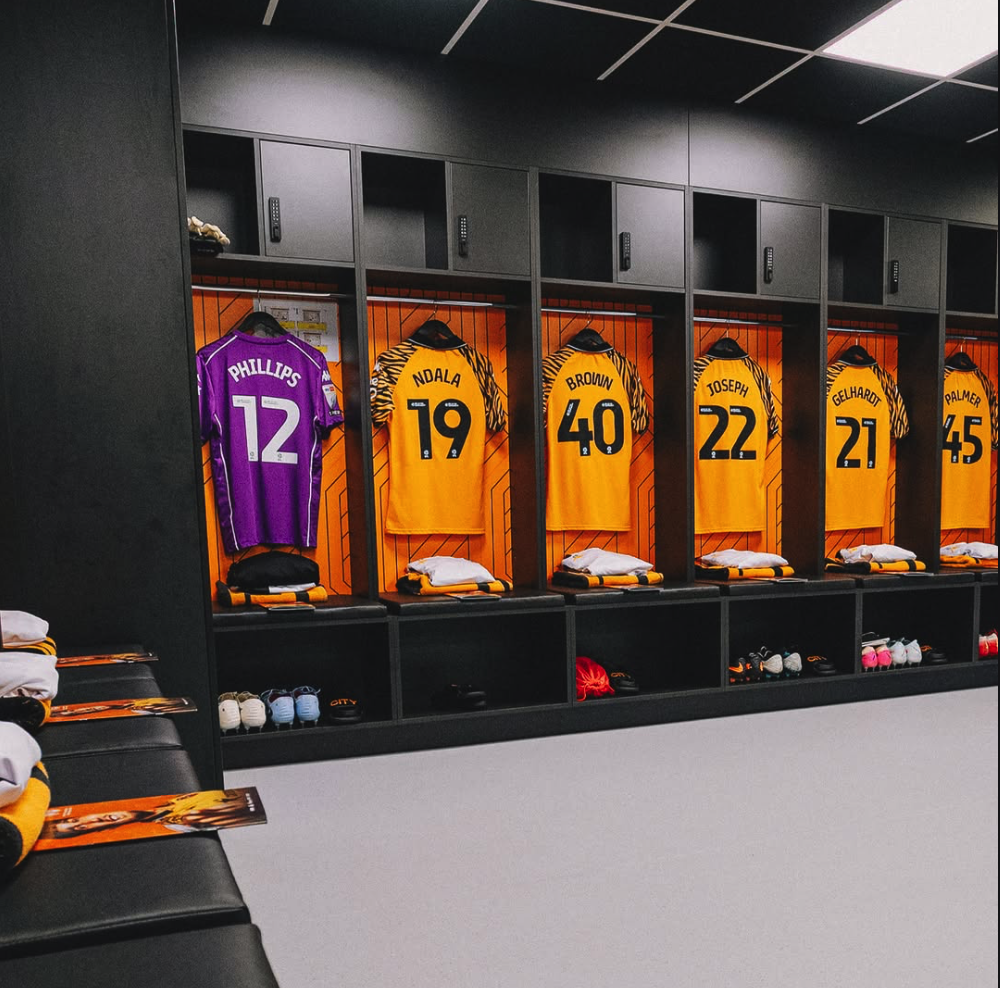
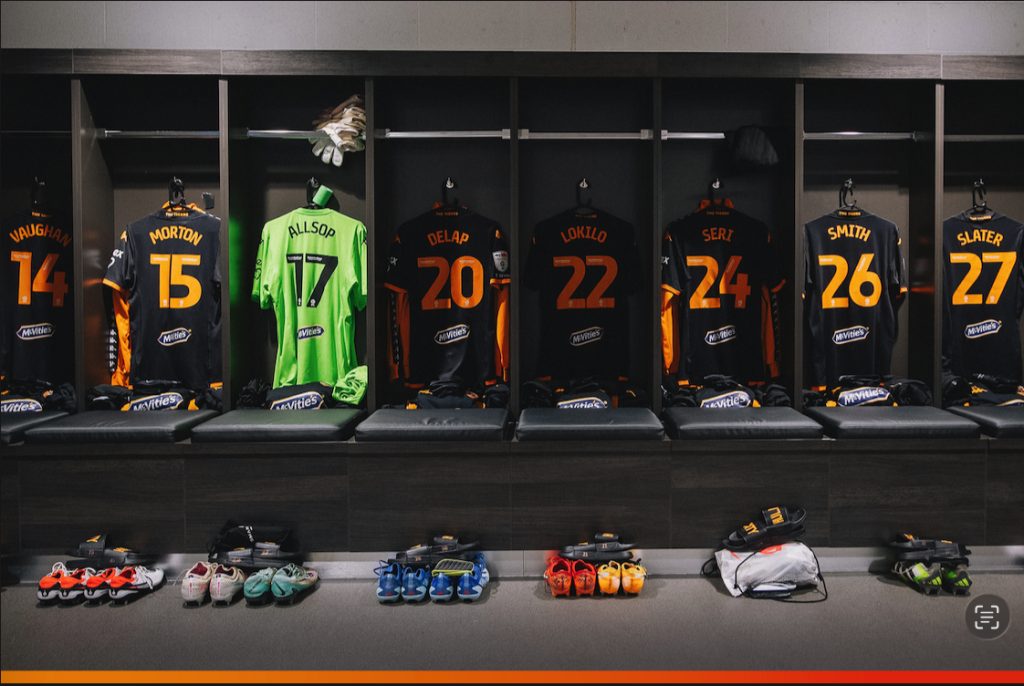
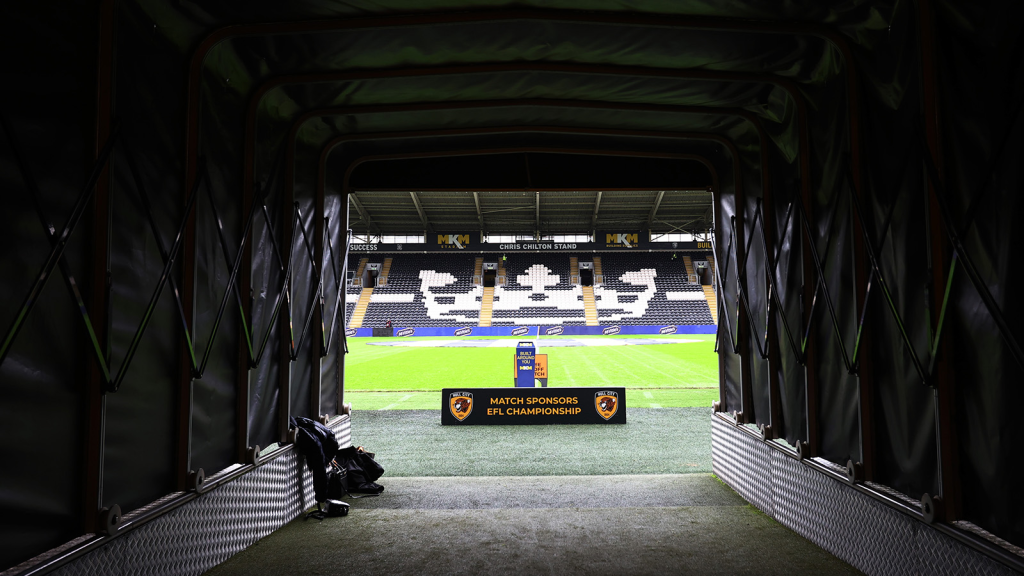
For my project my proposal is to create a 360 VR scene, the aim of my scene is to create a fully immersive VR experience, the scene I want to create is an authentic experience of what a football player would experience on a match day. The scene will be created using blender and will be a short story that progresses where the user will begin in the changing rooms and will progress through the stadium until they eventually walk out onto the pitch. I will aim to model my scene as close to the Hull City changing rooms and tunnel as I can as my aim is to create a free experience for specifically Hull City Football Club fans so they can get a similar feeling and emotion to what the players would before beginning a match. To further add to the experience I will add sound to the experience to add to the emotion and make it feel as authentic as possible, for example, I will add a rumbling sound of the crowd inside the changing rooms which will get clearer and louder the closer they make it to the pitch. I want to create this scene and pursue this project as 3D modelling is something that I don’t have a lot of experience in and so choosing to do this project will further push me and develop my Graphic Design skills in an area I’m not that experienced and skilled in.
As mentioned, this project will be based off a real life place, however this isn’t a place that has easy access to and so will be modelling my scene based of a number of images that I will source online and piece together to make as close to a 1:1 representation I can.
Chosen Technology Research
In order for me to create a successful and well designed production piece within my chosen technology I did some research into this technology and the necessary steps in order to achieve this.
“Virtual Reality (VR) has exploded onto the scene, offering immersive experiences that transport users to fantastical worlds or recreate real-life scenarios. But creating a truly captivating VR experience requires more than just mind-blowing technology. Graphic design plays a crucial role in shaping the user’s journey through this virtual world.” (Jamtion, 2024)
The world of VR is a rapidly growing and expanding universe that has endless possibilities, how we typically design can change drastically within the world of VR as we are no longer designing on a flat surface but a 360 canvas. When it comes to designing in VR there are a number of key things that need to be considered.
- Scale: As a VR user can view your work from any distance or angle they like it is key to make sure your designs are high definition and correctly scaled, a person can get as close to your design as they please so a design that isn’t correctly scaled or in a high resolution can appear blurry and unrecognisable.
- Depth: The world of VR allows user to see and perceive depth just as they would in the real world, it is key to play around with perspective when creating a 360 scene and layering in order to create a sense of depth and distance within the scene.
- UI Changes: As the design won’t be on a traditional flat and 2D surface UI elements such as menus buttons, sliders and so on would need to be reimagined, it is important to not over do the design and keep it as minimal as possible so that it is easy and clear for the user to interact with.
- Hierarchy within the 3D world: Information that is more important to the user should be prioritised, this can be done by making it more clear and visible to the user so that they are more likely to interact with it, with the lesser important information could be merged within the background graphics.
- Learn the use of programs such as Unity or Unreal Engine: The use of these programs will help the workflow between design and development and creating a well functioning VR experience.
- Prototyping: It is imperative to keep testing and prototyping your project and scene as it progresses through each stage using VR development tools in order to test things such as user experience and highlight areas that may need tweaking/ improving. Doing this regularly and ideally before the final stages of applying graphics can be beneficial and time saving as it will avoid needing to go back and do repeated steps again.
Based off the research I have found there will be a number of UX considerations I will need to keep in mind when designing my 360 scene:
- Motion Sickness: as this is a fully immersive scene people may be prone to motion sickness, to counter this from happening I will try to avoid any fast motion and not have the scene moving at too fast of a pace.
- User safety: when in VR a lot of people make the mistake of clashing with objects in the real world as they can’t see their surroundings, to avoid any injury or harm to the user I will include a number of things. Firstly, I will add a reminder for the user not to actually move in real life and to only move using the provided VR controller. Secondly, I could add an extra reminder for the user to quickly remove their VR headset and check their surroundings and make sure they aren’t near any objects they may mistakenly hit. Lastly, I could add a setting that would disable the user to be able to move at all and have the scene move for them.
- User health: another thing to be considered is how the user will cope physically within the scene as a scene that is too long can potentially cause eye strain or aches from the headset or controllers, my aim for my scene is for it to be just over a minute long which should lower the risk of this. Another important thing to consider is claustrophobia, a scene that is too packed, small or tight could cause unnecessary stress to the user or in even more extreme cases panic attacks, to avoid this I will make sure my scene is well spaced out and make sure there is a lot of room for the user to move/ explore.
Project Planning
When it comes to planning out my project and the steps I aim to take I made use of Trello Boards to simply and clearly outline the stages I aim to design my project in based off my research and knowledge I have gained.
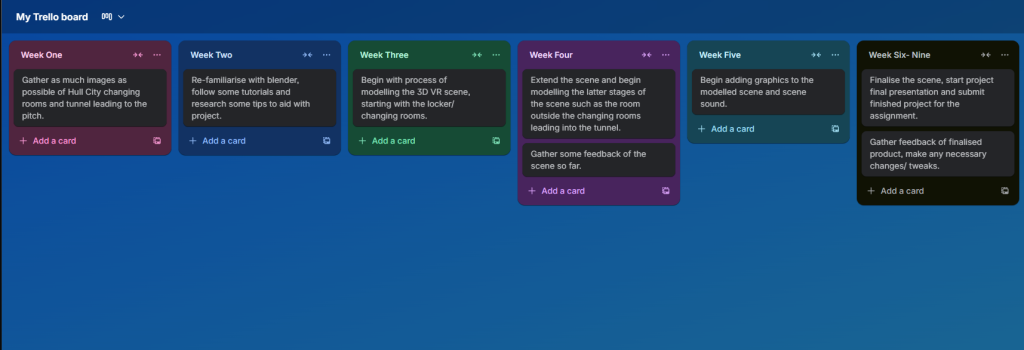
Using Trello Boards allowed me to give myself a clear and organised idea of how I aim to arrange and design my project in stages week by week. The gap between this assignment due date and the final production piece due date is 9 weeks so I have split it into an initial six weeks which gives me three weeks spare which can be used as extra time for any of the stages if need be.
Week One: Research and Design Reference Images
This first week will be spent with me researching and gathering as much media and photos I can find as possible of the interior of the scene I want to design (Hull City FC) I plan to do this by going through the teams social media pages saving any relevant media that I find useful to use to piece together my modelled scene. This will be combined with any images/ media I find useful by searching through the web also.
Week Two: Re-familiarising with the Blender Software.
This week will be spent with me re-familiarising myself with Blender and how to use the software as I have had a long period of time out doing any form of graphical work due to health reasons. I will spend this week experimenting with tools within blender following and watching some tutorials on YouTube and researching again useful tips/ tricks within Blender and also getting back up to speed with animation within blender.
Week Three: Beginning of 3D Modelling.
This week will be the beginning of creating of my 3D scene, I will piece together all the images I have sourced/ collected and begin with piecing them together and beginning with the modelling of the locker/changing rooms creating a scene that is as close to the real life version as much as I can possibly make it.
Week Four: Continuation of Scene Modelling and Feedback.
For this week I will expand out the scene I will have already begun and expanding it further to the next stages of the scene which will be the rooms leading from the changing rooms into the tunnel. Once this is done I will then collect some feedback from either classmates/ students or what would be helpful is Hull City fans, doing this will allow me to make any needed tweaks/ changes needed and getting feedback from fans would be the most beneficiary as this experience is specifically tailored to them.
Week Five: Adding Graphics and Early Renders.
In this week I plan to add the final graphics to the scene and begin a first render of the scene with these applied graphics to see how it comes out and see an early finished product, once this has been done I will then add the background sound to the scene which will be the sound of the crowd that will be progressively clearer/ louder as the user progresses throughout the scene.
Week Six: Final Touches, Feedback and Presentation.
The final week will be spent gathering final feedback of my finalised scene and then following any advice and applying and changes or tweaks needed for the scene, once finalised I will then record my final presentation showcasing my finished product ready to be submitted once the deadline arrives.
Spare Weeks: Extra Time if Needed
I have planned my project out with three weeks to spare, this is done more for if I need the extra time during the design and modelling process of my scene and adding any extra details or making any extra changes that may be needed during the development of the scene.
As already mentioned this scene will be made in Blender, for the modelling of the changing rooms my aim is to create everything for that section myself, however for my scene my idea is to have modelled players inside my scene that the user will be apart of, the model of these players I may download online that I will provide any needed link to. The experience I plan to also include some interactive elements to which is where the use of unity may be needed to integrate these interactive elements into my scene.
User Stories
To help me come up with some scenarios of what some users needs may be I made use of AI and asked to form some examples of user stories and how I could plan to cater to the needs of these users.
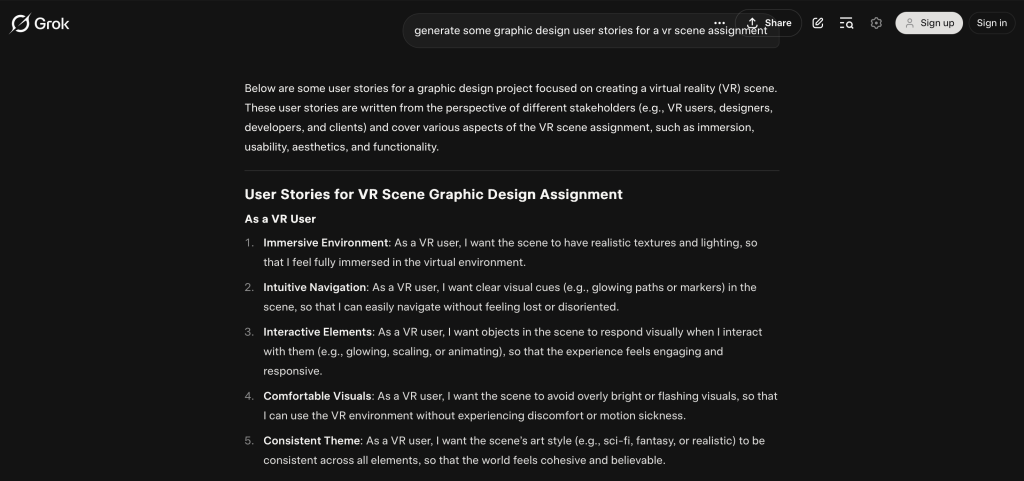
User 2: this user wants clear visual clues so that they can easily navigate throughout the scene. For this user and for my scene I could either add an arrow that points the user into the correct direction to go to progress to the next stage of the scene, or I could just add a glow around the door.
User 3: this user wants interactive elements within the scene, for this I could include a music player inside the locker room that the user can either play or pause, moving when playing and static when not, this is something that would still be authentic as music is something that is typically played by players in a locker room before a match.
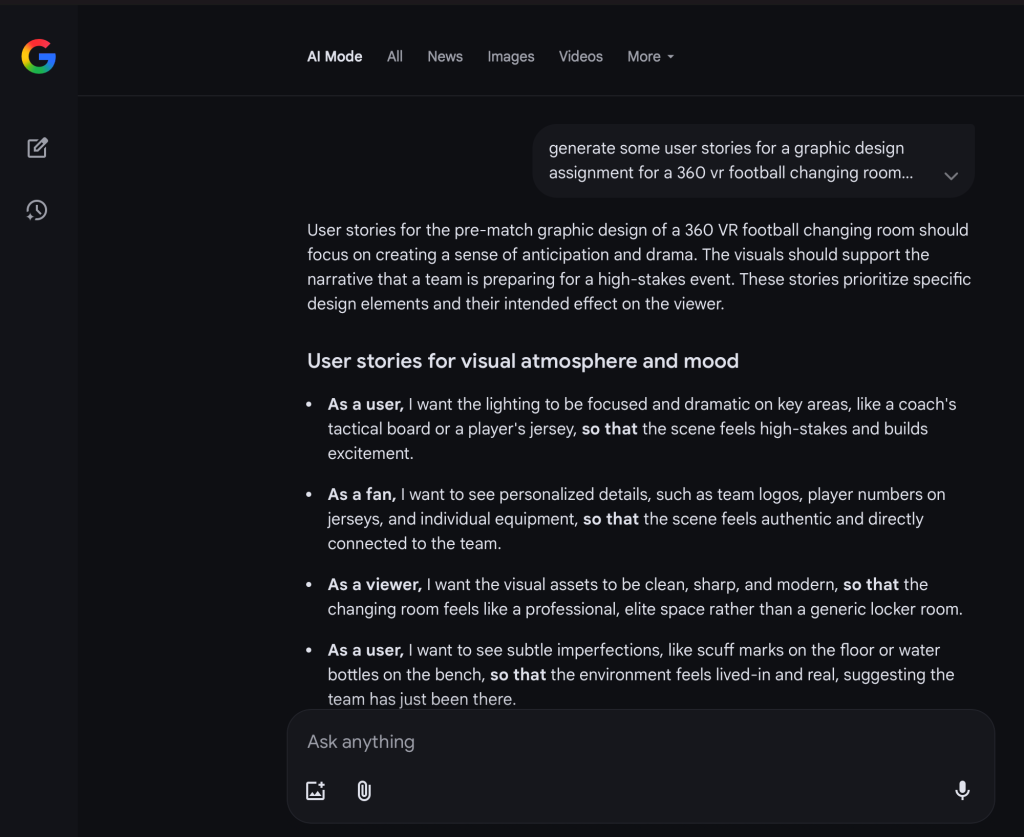
User 2: this user wants the scene to be as authentic as possible to the real life counterpart, this is something I aim to provide within my scene as I plan to include exactly what they ask for, authentic player names numbers and so on within the changing rooms and the equipment modelled in their designated lockers such as football boots, shin pads, team wear etc.
User 4: this user wants the scene to feel as real as possible with subtle imperfections. This could be created within the scene by including graphics in the scene that aren’t flawless and have things such as scuffs within them, a scene that shows it is used on a regular basis and has been worn and “lived-in.”
Storyboard
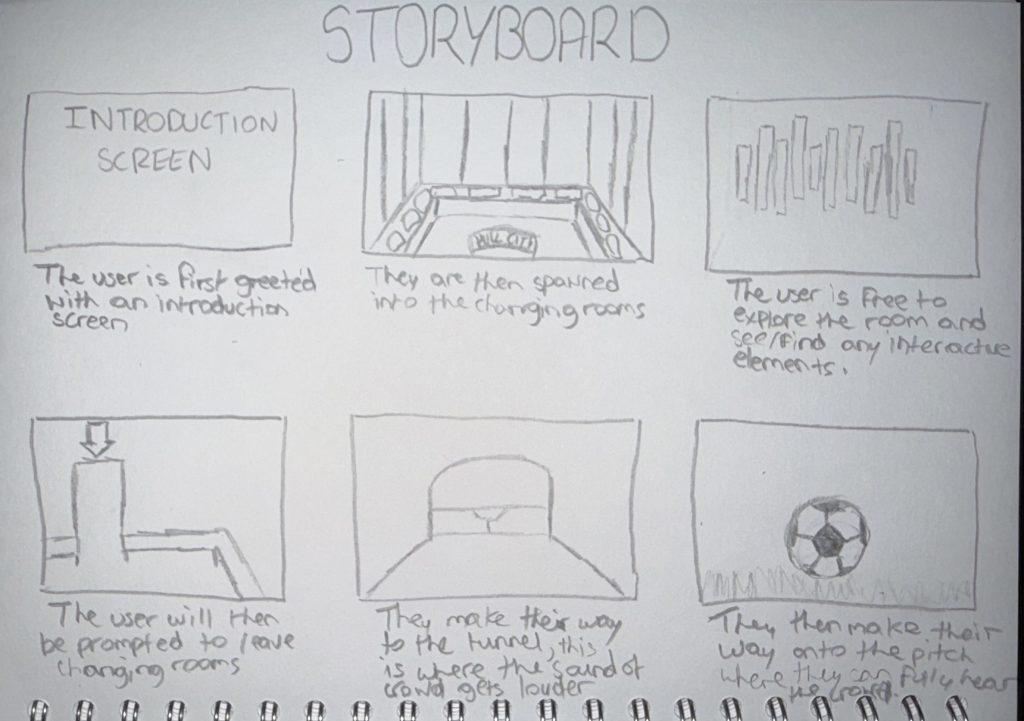
I created the above storyboard to give myself a rough idea of how I plan on letting the scene plan out, highlighting the key parts of the scene and also elements that I plan to add to the scene.
I have highlighted key elements in the storyboard such as the music player to show I intend on adding interactive elements to the scene, having a scene full of these elements will engage the user a lot more and avoid them getting too easily bored. I also highlighted and shown a rough sketch of an arrow showing how I plan on guiding the user to progress through the scene to avoid any confusion or irritation. Lastly, I have mentioned within the notes how I plan on adapting the sound as the user progresses through the scene to also add a sense of progression and to also add to the atmosphere and emotion of the scene making it as immersive as can be. Having a scene that just has the same sound playing can create a sense of repetitiveness and could make the scene seem more unrealistic and unnatural which is something I want to avoid.
Reflection
This technology I chose as its something that I don’t have too much experience in and have somewhat of an interest in as it allows me to create a scene of something that I hold interest in (Football) and combine it with my profession and in the world of Graphic Design. This technology I chose also as I feel it is the most emerging technology of the lot as VR is a world that is rapidly evolving and growing, as something that started with putting mobile phones into a box and looking around to now having fully working high resolution headsets that can fully immerse you into almost anything that you can think of. Combining this with the world of Graphic Design make the possibilities almost endless with the only thing stopping something from been created is the persons creative mind creating whatever it is they may create.
For my chosen project specifically, I feel my chosen scene is quite unique and innovative as it isn’t something I have yet seen be done yet by any other football team and what would make this project successful is having a Hull City fan experience my 3D scene and have them actually feel as if they have experienced what a Hull City player would be feeling when preparing for a match and have them feel as though they were a part of the team.
References:
Image 1. Hull City, Facebook (2025). Available Online: https://www.facebook.com/hullcity/posts/take-a-closer-look-at-our-new-look-changing-rooms-at-our-free-stadium-tours-next/1357570799068379/
Image 2. Hull City, X (2023). Available Online: https://x.com/hullcity/status/1738273196250456516?s=61
Image 3. Southampton, X (2023). Available Online: https://x.com/southamptonfc/status/1715699698353238406?s=61
Jamtion (2024) How to do Graphic Design for virtual reality? [Article]. Available Online: https://www.linkedin.com/pulse/how-do-graphic-design-virtual-reality-jamtion-vlwyc